Showing posts with label open source. Show all posts

Sunday, September 14, 2008

ZScreen - Open Source Screen Capture program


There are many screen capture programs out there, but the Open Source ZScreen gives them all a run for their money.

ZScreen has a plethora of options when it comes to capturing the screen and what to do with the captured image. It has the standard 3 ways of capturing the screen (selected region, active window, or the entire screen), and a number of options to choose from afterwards. You can either directly copy it to the clipboard, open the captured screenshot in an image manipulation program of your choice, upload the captured image to an FTP server, or simple save the image automatically in a predefined folder in an image format of your choice, and you can tweak almost all the settings for any of these actions. This software is a must have for anyone who frequently takes screenshots.


Grab the software from here (You'll need the .NET framework to run this).

GanttProject - Open Source replacement for Microsoft Project


If you are doing higher studies in IT or Business (Or any other), when you get to work on projects, you usually have to submit a documentation. And when preparing this documentation, the last thing you usually do before submitting is creating the Gantt chart (Although its supposed to be done first!). Most of us usually use Microsoft Project to create this. Now you can use an Open Source alternative called GanttProject.

GanttProject is very much similar to MS Project, with the tasklist on the left hand pane and the graphical timeline on the right hand pane. There are two tabs on the main window, one for the Gantt Chart and the other for the resources allocated for whatever the Gantt chart is made for. There is also an option to get the corresponding pert chart for the Gantt chart.

The software is not bloated like MS Project and has all the necessary tools to quickly create a chart. Plus, you can export the charts you create into several formats including JPEG and PDF. I never considered Gantt charts seriously and couldn't make head or tail of it. If you have the unique combination of being into Project Management and Linux, GanttProject is the way to go. You can download it from here.

Saturday, September 13, 2008

UltimateDefrag - Powerful Defragger and Optimizer


We all have defragged our hard drives at some point. Usually we do this using the defragger that comes with Windows itself. But if you want to squeeze that last nanosecond of speed out of your hard drive, you can use UltimateDefrag.

UltimateDefrag is an advanced defragger that, unlike other software of its kind, gives the user complete control over (almost all) the inner workings of the defrag process. You can defrag individual files, folders, or even applications and you can place them around the hotspots (places which are easily accessed) on the hard drive.

The software defines two types of files. High performance and Archive. High performance files are those files you access frequently and will be placed so as to minimize access time. Archive files are the ones you rarely use and will be defragged so as to not get in the way of the high performance files. You can either let the software automatically select the high performance and Archive files or you can select which files to be in these categories manually. You can also include files based on their extension which is good if you want to access a particular file type quickly, like .EXE files. There are many other options for defragging, but the best part of this software is its visual representation of the fragmentation, which gives a very good picture on how files are physically laid out in the hard drive. You can click on any part of the disc and see what files are stored in that particular sector.

UltimateDefrag. Notice the name of a file stored at a particular sector
on the hard drive displayed at the bottom left corner

Needless to say, the software is a bit complicated with a lot of options to choose from. Fortunately, there is a PDF file which explains all the bells and whistles of the software, and also gives a good idea on how hard disks work, and fragmentation occurs, etc... You can grab UltimateDefrag from here.

Friday, September 12, 2008

BackTrack - Penetration testing Linux distribution


BackTrack is a Linux distribution based on Slackware, created for penetration testing purposes. It merges two existing distributions, Whax (formerlyWhoppix) and Auditor Linux, into a single powerful Live CD system.

BackTrack incorporates all the necessary tools used in security testing, like nmap, finger, traceroute, Metasploit and other software. The Live CD worked perfectly in my VirtualBox VM, but actual installation on a USB drive or a hard disk is a bit technical (Although anyone who seriously uses BackTrack can do this). BackTrack also has all the other usual software for web browsing, image manipulation, document editing, etc... BackTrack automatically comes with HTTP, SMTP, and other server software so there's no need for manually installing them. The major drawback to BackTrack is the lack of an updating mechanism.

BackTrack Penetration testing Tools

I don't recommend this distribution to the average user. Only those who are extremely curious or expert computer users should find any use for this. You can download the distribution from here.

Sunday, August 31, 2008

Track and Recover Stolen Laptops - Adeona


A very interesting software for all you laptop owners out there to try out is Adeona (Name of the Roman Goddess of safe return!), a free and open source tracking software. But before you get excited, know that this is not a foolproof method of protecting your laptop. In fact, if your laptop is really stolen with adeona already installed, I don't think it will be able to help you recover your laptop because of the current networking technology available in Sri lanka. But once that situation improves, this software can come in handy.

Adeona tracks the location of your laptop by recording its internet connection information, such as the IP address of your laptop, addresses of nearby routers, and also the names of nearby access points (for wireless connections only). This information, once collected, is encrypted, and then stored in the OpenDHT system.

Adeona installs two softwares to your computer. One is a client program which, at random times, sends the internet connection information to OpenDHT. The other is the retrieval software through which you can retrieve the stored information. In order to retrieve the information, the software uses a file called an Owner Recovery File (extension .ost) which is generated when adeona is installed. This file is of great importance as without it, retrieval of the information is impossible, even for the rightful owner. The recommended method of using adeona is to install the client on the laptop, backup the created .ost file to a USB pen or other medium which is secure, and delete the original file from the laptop. If the laptop is stolen, you can use the ost file and the retrieval software from any other PC in the world.

As you can see, a good networking system is required for this software to be effective. In western countries, where internet connections are readily available, and wireless hotspots are in abundance, this software is pretty useful. But here in Sri lanka, without such technology, adeona is limited in what it can do. But still, like I said, in the future, when these technologies are implemented (eventually), adeona is sure to become a very useful tool.

I installed adeona on my desktop computer, and after a couple of days, I tried retrieving my location information. Here is a sample.

info: ======== start location data =========
update time: 08/28/2008,19:09 (PST)
internal ip: 192.168.1.2
external ip: ---.---.---.---
access point: (n/a)
Nearby routers:
1 0.000ms 192.168.1.1 (could not resolve)
2 23.000ms 220.247.232.7 (could not resolve)
3 24.000ms 220.247.193.249 (could not resolve)
4 23.000ms 222.165.130.241 (could not resolve)
5 23.000ms 222.165.130.10 (could not resolve)
6 72.000ms 217.6.48.33 (could not resolve)
7 281.000ms 62.154.14.98 (could not resolve)
8 0.000ms 62.156.138.70 (could not resolve)
9 327.000ms 67.17.108.165 (te1-2-10G.ar2.MAD1.gblx.net)
10 348.000ms 67.17.108.165 (te1-2-10G.ar2.MAD1.gblx.net)
11 456.000ms 162.97.119.18 (could not resolve)
12 479.000ms 130.206.250.26 (NAC.XE1-0-0.EB-Barcelona0.red.rediris.es)
13 473.000ms 130.206.202.30 (cesca-router.rediris.es)
14 474.000ms 84.88.18.18 (upc-anella.cesca.es)

Quite interesting information (I've blanked out my external IP for obvious reasons). The first entry under nearby routers is an internal address. The second entry is the gateway address given by SLT. An although I'm not sure on this, I think entries 3, 4, and 5 all are gateway addresses of SLT. About 7 entries couldn't be resolved into domain names (because they don't have domain names). Entries 7 and 8 belong to a one Deutsche Telekom AG, the largest telecommunications company in Germany and the EU, while number 12 is somewhere in Spain.

Most of this information is repeated throught the retrieved location information, since I am using my desktop computer to run the program. The program can be truly tested only on a laptop, which changes location often, and has a good internet connection. If anyone does carry out this, please drop in a comment with your observations.

Grab the software from the Adeona website.

Wednesday, August 27, 2008

Ubiquity - Letting you connect to the web in a brand new way


I just installed and tested the latest extension from the good folks at Mozilla Labs, called Ubiquity. So far, it has been a great experience. I am not good with words, so here is a description from the Mozilla Labs blog.

"Today we’re announcing the launch of Ubiquity, a Mozilla Labs experiment into connecting the Web with language in an attempt to find new user interfaces that could make it possible for everyone to do common Web tasks more quickly and easily.

The overall goals of Ubiquity are to explore how best to:

  • Empower users to control the web browser with language-based instructions. (With search, users type what they want to find. With Ubiquity, they type what they want to do.)
  • Enable on-demand, user-generated mashups with existing open Web APIs. (In other words, allowing everyone–not just Web developers–to remix the Web so it fits their needs, no matter what page they are on, or what they are doing.)
  • Use Trust networks and social constructs to balance security with ease of extensibility.
  • Extend the browser functionality easily."


Ubiquity introduces a command line interface through which the user can issue interactive commands. And I repeat, Interactive. This is not the dull ms-dos command prompt (Dull?) most of you are used to (Ubiquity does introduce a new item to the context menu). Ubiquity is sensitive to every action you take on the page. For example, if you highlight a word in a website and then bring up Ubiquity, you'll see several suggestions for that highlighted word. There are many other interactive commands and stuff, and the best thing is, you can define your own commands to do what you want. In this sense, Mozilla is making the user a kind of a programmer (without all the gory details). I have tried out the tutorial at their site and I suggest you do the same. Remember though, that this is still in beta, so don't try it if you aren't comfortable with tinkering around firefox.

You can grab this extension from https://people.mozilla.com/~avarma/ubiquity-0.1.xpi

Tuesday, August 26, 2008

Visit any website you want (yes, even banned ones!)


I first thought of giving this post the following title: "Freegate - Anonymous surfing", but then I thought the current title applies much better (to the current situation). So there is going to be a ban on porn websites. I have nothing against that (What! then what about this?). But I have a feeling that this isn't going to stop here. Soon they will try to stop Bittorrent and P2P too. This post is not a rebellion, but, well I dont know why I'm actually posting this, but here goes.

Freegate, a Free and Open Source software, is described as "an anti-censorship software for secure and fast Internet access" by its creators. It works as a local proxy, channeling all your HTTP requests through a network of proxies known as Dynaweb. The proxies of this network change their own IP addresses and domain names constantly, so ISPs cannot block the proxy servers themselves indefinitely. Dynaweb monitors the blocking status of all its servers and changes the IP addresses once a blockage is detected, but I think this monitoring is done mostly for routers sending data to China (Dynaweb creator is a Chinese man who dont like the Chinese government!), so blockages by our own dear ISPs might go unnoticed. But still, Dynaweb has far too many servers changing IP addresses far too many times for them to handle (I hope).

Many of you might be familiar with JAP, which is another local proxy software, but I found out that JAP has gone commercial. Of course, there are other great proxy software, like Privoxy, but Freegate is a simple software that can be used by the average computer user. It is only a single .exe file which can be run without any installation, and automatically setups IE to use the proxy when surfing the web. Firefox users will have to manually set the proxy information in the options window (See below picture).


Grab Freegate from http://us.dongtaiwang.com/loc/download_en.php

P.S - If you have a firewall, you need to give freegate access to the internet. Refer to your firewall documentation for this.

P.P.S - Keep tuned for more 'surfing banned sites' tools.

Sunday, August 24, 2008

Songbird - Music Jukebox for Linux


iTunes is the frontrunner when it comes to Music Jukeboxes for the Windows platform, but there is no version of iTunes available for Linux. This is not much of a problem because good ol' Free and Open Source solutions are out there for you, and this blog is about one such player, Songbird, available for multiple platforms and OSs.

Based on the stable Mozilla Platform, Songbird has all the features you would expect from a typical Jukebox including support for multiple file formats, Skinnable interface, and an extension system that is the same as in Firefox. The User interface is modeled after the familiar iTunes interface, with links to the library, Bookmarks and downloads housed on the left sidebar. Listening to online radio is a simple matter of clicking the SHOUTcast link on the left sidebar.

Since its based on Firefox, Songbird inherits the Firefox extension system and can act like a web browser, and also has the ability to play media off web pages. There is a feature called Birdhouse included that lets you discover and download new music according to your taste.

Songbird is a new project under active development, so it still has a few drawbacks to it. When it comes to external devices, Apple iPod is supported but not the iPhone (Should not be a problem for most of us). CD ripping is still not available as is video playback. Another important feature missing is the ability to watch given folders for changes in music.

I tested the 64bit version of songbird in Ubuntu linux and was just OK with the performance. It was a bit too slow for my liking (64bit should mean faster performance dont you think?) and takes up a fair amount of memory if kept running for a long time (See the Below picture).


All in all, I would say Songbird is a reasonable choice as your standard Jukebox, but I recommend waiting until all the new features are implemented and the stability and performance issues are resolved.
You can download songbird from http://getsongbird.com/

Tuesday, August 19, 2008

Download Faster in Firefox - DownThemAll.net

This is one of the best add-ons i've ever seen for the Open Source browser Firefox. Downthemall (or dTa) is a very good download manager that works inside Firefox. It allows the user to download the current web page and all the links going from it with a single click.


It has most of the functions you would expect from a website grabber (But no support for grabbing a site in all its entirety), including a nice filtering feature which allows the user to download only specific types of media embedded in a page. But the best feature of all is the speed of the downloads. Under the SLT 512Kbps download speed limit, dTa achieves an average speed of about 50Kbps, but this is not always the case. Although I have no idea about the internal workings of this extension, it seems to achieve these speeds by breaking up the download into small pieces. But this is possible only in servers which support this kind of HTTP requests. For example, Rapidshare doesn't allow multipart downloading, therefore dTa slows down when downloading from these servers. Another thing to note is that although dTa supports FTP, downloading through this protocol is very slow, and I recommend using this extension only for HTTP downloading. You can install this extension from their website, www.downthemall.net

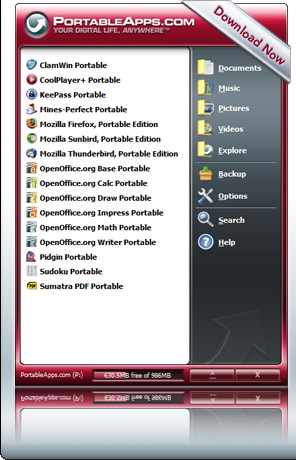
Portable Applications for the USB - PortableApps.com


This is a must have for all you 'heavy-duty' computer users out there. A software which contains all your favourite programs in their portable versions. Quite handy if you are moving around different desktops all the time, so you can carry your settings (like instant messaging) without any trouble. The pack contains all kinds of useful software like Firefox for web browsing (like you didn't know that!), Pidgin for all your instant messaging needs, and more importantly, a portable version of OpenOffice, the Open Source alternative to Microsoft Office. The pack comes in 3 versions, which vary on the number of applications they contain. Still, the biggest download, containing all the software is exactly 113.72 Mb, which expands to 350 Mb once installed onto the flash drive. 350Mb is reasonable, considering all the software bundled into it. You can grab this software from www.portableapps.com